
30 Dec 2025 · Architecture, Security
How to Use Workspace Identity to Deploy Microsoft Fabric in Production
A production-ready multi-workspace architecture with no personal accounts.
How to design a production-ready Microsoft Fabric environment using Workspace Identity and Service Principals in a multi-workspace architecture.
Architecture overview
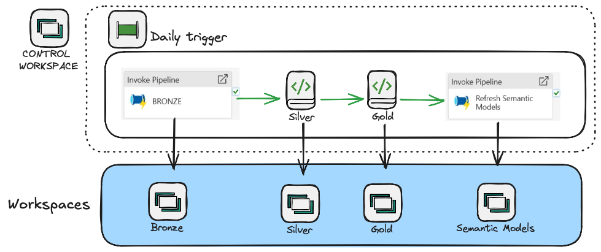
The solution is structured around multiple workspaces, each with a clear responsibility:
- Bronze workspace → data pipelines for ingestion
- Silver workspace → notebooks for transformation and standardization
- Gold workspace → business-ready dimensions and fact tables
- Semantic Model workspace → Power BI semantic models
- Control workspace (orchestration) → a daily trigger pipeline orchestrating the entire flow
The daily trigger pipeline (located in the Control workspace) executes the following steps:
- Run ingestion pipelines in the Bronze workspace
- Execute Silver notebooks
- Execute Gold notebooks
- Trigger semantic model refreshes in the Semantic Model workspace
This approach centralizes orchestration while keeping domain logic isolated per workspace.
Security & identity: workspace identities in production
To make this production-ready and avoid personal accounts, I used Workspace Identities (Fabric-managed identities) — one created for each workspace. This setup enables:
- Cross-workspace execution
- Fully automated pipelines
- No dependency on user accounts
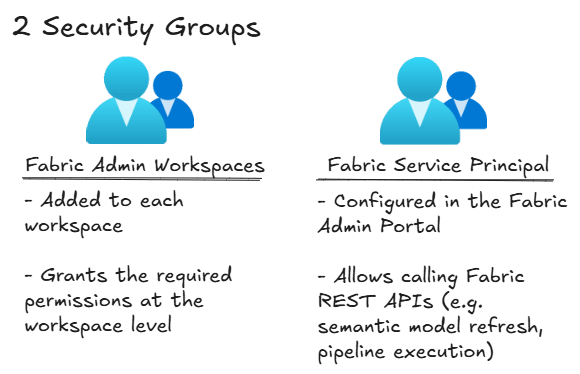
Two security groups support this:
Fabric Admin Workspaces — added to each workspace, grants the required permissions at the workspace level.
Fabric Service Principal — configured in the Fabric Admin Portal, allows calling Fabric REST APIs (e.g. semantic model refresh, pipeline execution).
Connections strategy
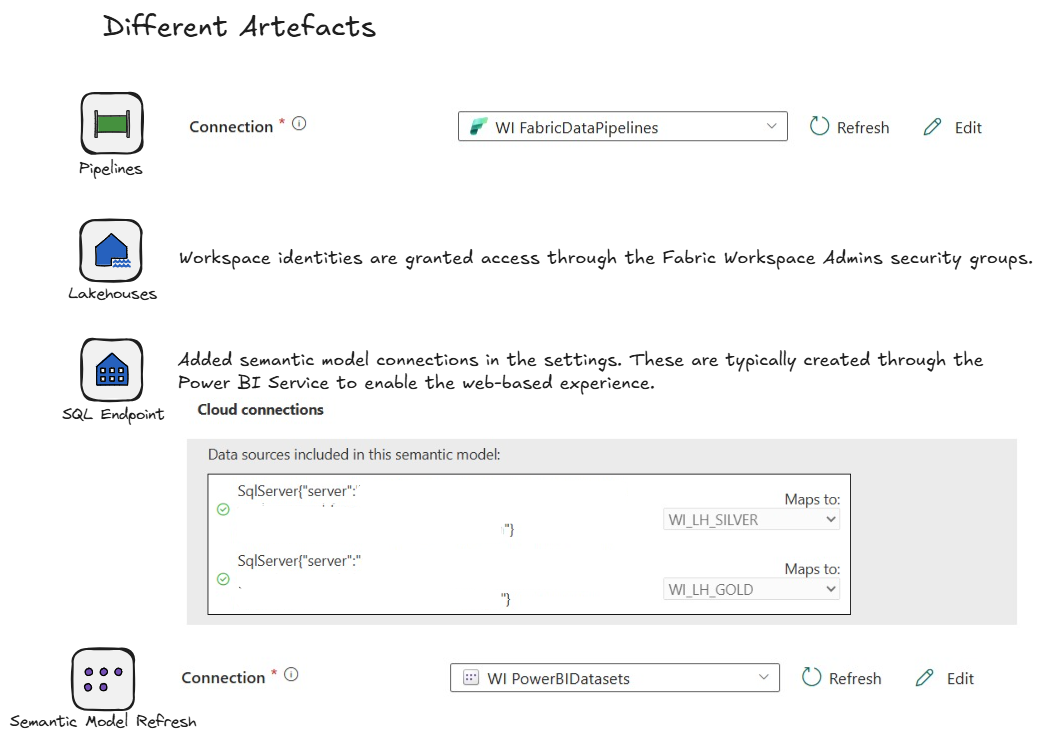
To support automation, I created explicit connections for each Fabric artifact — pipelines, lakehouses, SQL endpoints, and semantic model refresh — all granted access through the Fabric Workspace Admins security groups. All production executions (pipelines + notebooks) run using service principal / workspace identity–based authentication.
Current limitation: semantic models in Power BI Service
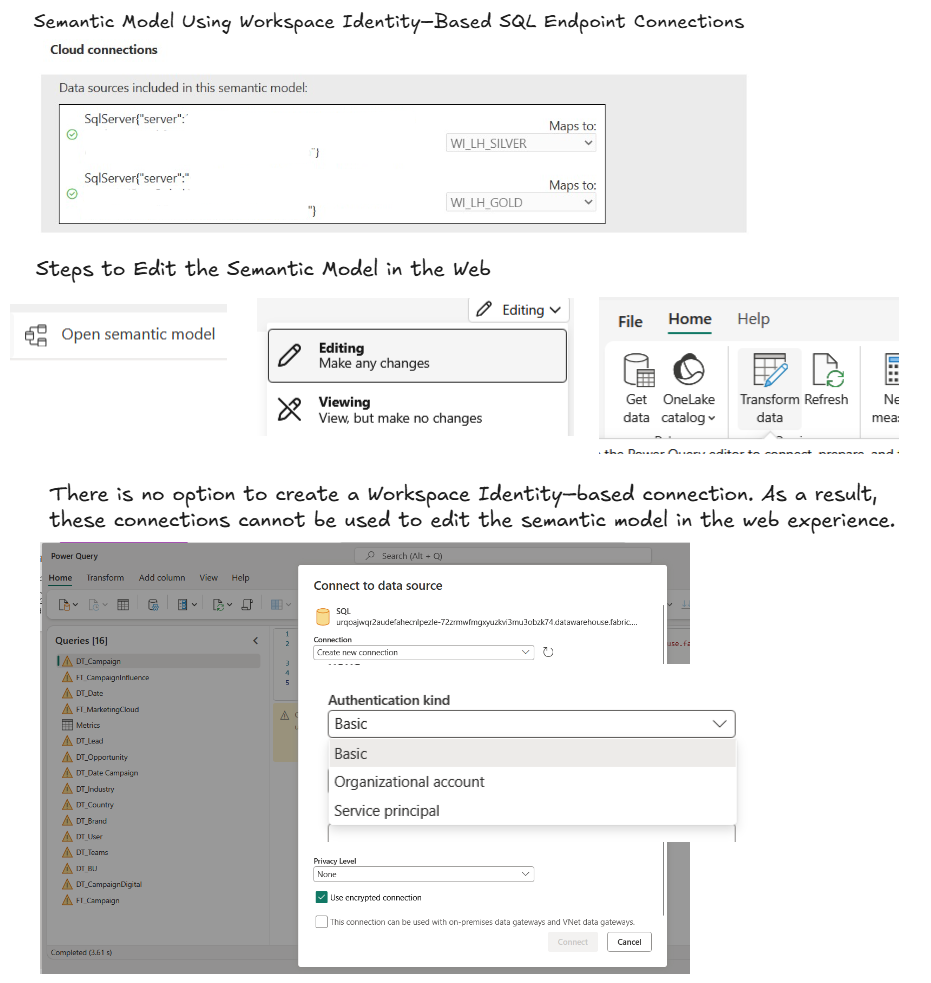
One important limitation I encountered: when editing or modifying a semantic model directly in the Power BI Service (web), it is currently not possible to create or manage connections using a Workspace Identity.
What this means in practice:
- If you open a semantic model in the Power BI Service
- And want to modify it without downloading the PBIX
- You must use a user-based connection
- After editing, you need to remember to switch back to the Workspace Identity connection for production
A practical workaround (for now)
The cleanest approach available today:
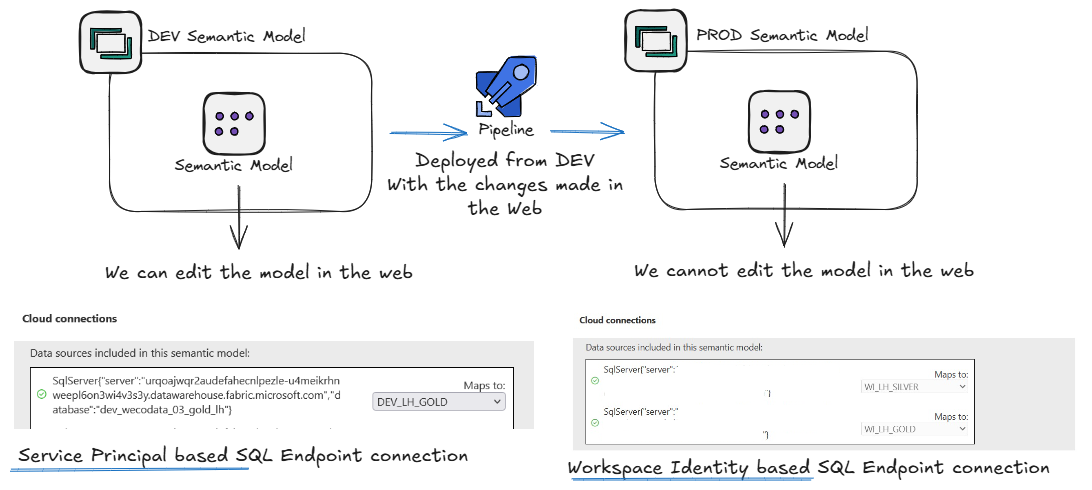
- DEV semantic model — uses a service principal–based SQL endpoint connection. We can edit the model in the web.
- PROD semantic model — uses a Workspace Identity–based SQL endpoint connection. We cannot edit the model in the web.
- A pipeline deploys from DEV to PROD with the changes made in the web.
The connection type is switched during the deployment or release process. Not ideal, but currently the cleanest way to keep web editing capabilities while maintaining secure, non-user-based authentication in production.
Final thoughts
Addressing the criticism around Microsoft Fabric
It’s important to be transparent: Microsoft Fabric is still a young platform, and it is currently receiving quite a bit of criticism in the data community. Common feedback includes:
- “Fabric is not ready for production”
- “Too many features are still evolving”
- “Enterprise governance is not mature enough yet”
These concerns are understandable. Fabric is ambitious: it unifies data engineering, analytics, and BI into a single SaaS platform — and that level of integration takes time to stabilize.
Why identity & automation change the narrative
That said, from a production-readiness perspective, the introduction of Service Principals and Workspace Identities is a major step forward. With these features, Fabric now supports:
- No personal accounts in production
- Identity-based authentication aligned with Azure Entra ID
- Fully automated pipelines and semantic model refreshes
- Cross-workspace orchestration with clear security boundaries
A realistic view
Is Microsoft Fabric perfect today? No.
Is it production-ready for well-designed architectures with clear workspace separation, centralized orchestration, service principals & workspace identities, and controlled connection management?
Yes — with known limitations. The remaining gaps (especially around semantic model authoring with workspace identities in the Power BI Service) are real, but they are platform limitations, not architectural flaws.
Conclusion
Microsoft Fabric is still maturing, and the criticism is not unfounded. However, identity management, automation, and governance are moving fast, and features like Workspace Identities and Service Principals already place Fabric ahead of many traditional BI and data platforms in terms of production hygiene.
Fabric may be young — but its foundations are clearly enterprise-oriented.
Enjoyed this?
Get new articles like this one straight to your inbox.