
29 Jul 2026 · Data Engineering, Spark
Fabric Runtime 2.0 (Spark 4 + Delta 4): What's New, and Should You Use It Yet?
The 8 changes worth knowing about Microsoft's next-generation Fabric engine — and whether it's safe to use today.
What you’ll get from this article
By the end, you’ll know:
- What Fabric Runtime 2.0 actually is, in plain terms — then a look under the hood.
- Why Microsoft is shipping this now.
- The 8 changes worth knowing — explained simply first, technically second, with how to actually adopt each one.
- How table maintenance changes — and why “auto compaction” and “clustering” are not the same thing, a distinction that trips people up.
- Whether it’s safe to use today, and how it should shape your architecture decisions.
- Where every claim comes from, so you can verify it yourself.
TL;DR
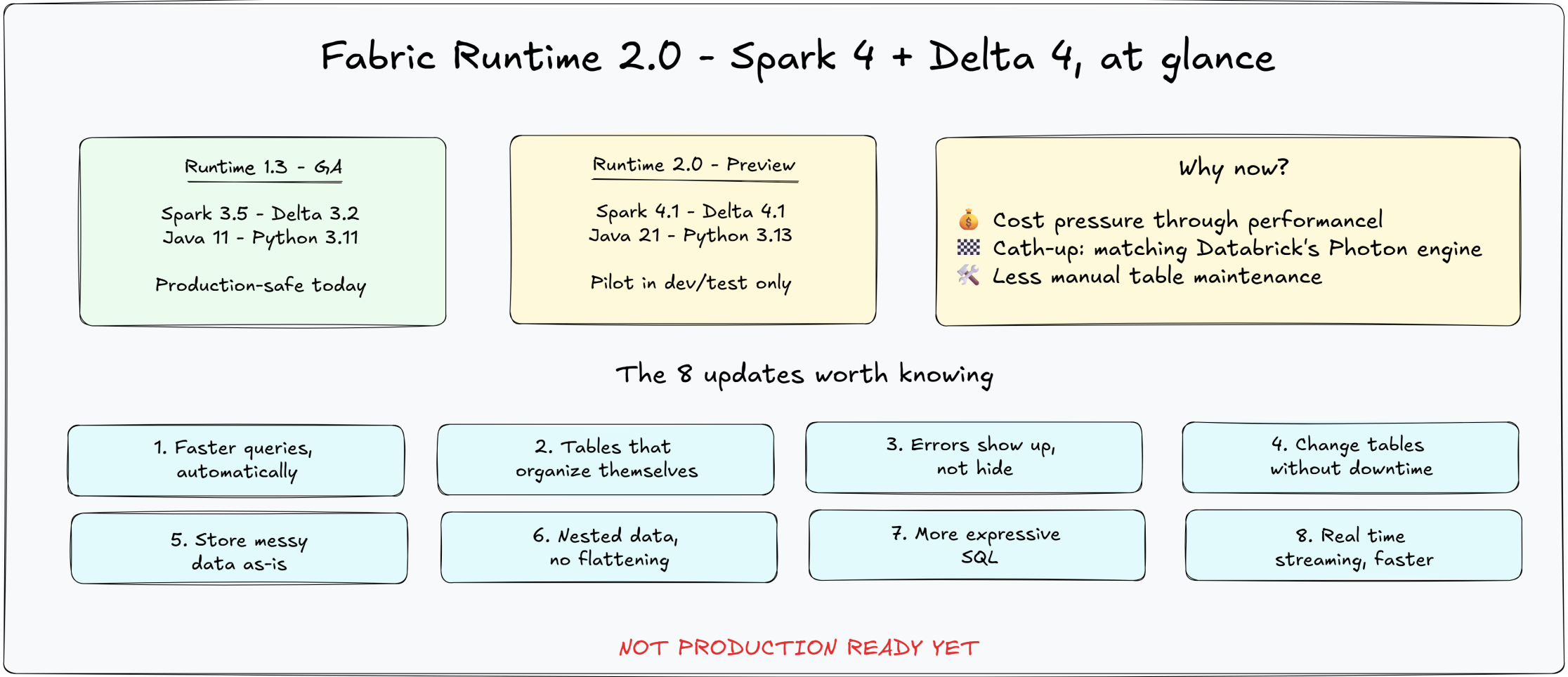
Microsoft Fabric has a new engine in preview: Runtime 2.0, built on Apache Spark 4.x and Delta Lake 4.x. It’s faster, better at organizing data automatically, more expressive in SQL, and stricter about catching bad data early. It’s not GA yet — production workloads should stay on the current version for now.
If you’d rather watch this than read it, Miles Cole (Spark Specialist at Microsoft) has a good video covering this same material in more depth: Inside Fabric Runtime 2.0: Spark 4 and Delta 4 in action — several of the updates below draw directly from it.
1. What is Runtime 2.0, in plain terms?
Think of Fabric like a car, and the “runtime” is the engine under the hood. Runtime 2.0 is a new engine Microsoft is testing — it’s not swapped in yet, it’s still in the test-drive phase.
What does it actually mean for you?
- It’s faster. Many things you already do in Fabric — running queries, cleaning up tables — could get noticeably quicker once this becomes your default engine.
- It catches mistakes earlier. Instead of quietly ignoring bad data (like a calculation error), it now speaks up and shows you the problem right away.
- It’s less manual work. Some table changes and cleanup tasks that used to need scheduling or coordination now just happen, without you babysitting them.
- It’s more expressive. Some things that used to require Python workarounds can now be written directly in SQL.
- It’s not ready for your important stuff yet. It’s in “preview” — Microsoft’s way of saying “try it, but don’t bet your production work on it yet.” Your day-to-day work should stay on the current engine (Runtime 1.3) for now.
The one-line summary: Runtime 2.0 is Microsoft’s next-generation engine for Fabric — faster and smarter, currently available to test but not yet ready to rely on for real work.
2. What’s actually under the hood
Every notebook, Spark job, and lakehouse table in Fabric runs on top of a “runtime” — the compute engine underneath. Today’s production-supported version is Runtime 1.3, built on Spark 3.5 and Delta Lake 3.2.
Runtime 2.0 is the next generation, currently in public preview, built on Spark 4.1 and Delta 4.1 (Java 21, Python 3.13). It’s the biggest engine jump Fabric has offered since launch — not a patch, a generational leap.
3. Why is Microsoft doing this now?
Three real forces are behind the timing:
Cost pressure through performance. Fabric bills on compute consumption, so a faster engine directly lowers customer bills. Microsoft’s own benchmarks show the Native Execution Engine running up to 6x faster than unmodified open-source Apache Spark on TPC-DS workloads — not a direct comparison against Fabric’s own Runtime 1.3 — translating to roughly 83% compute-cost savings on a fixed-size cluster in that benchmark. Your actual gain moving from Runtime 1.3 to 2.0 will depend on your specific workload and should be measured directly rather than assumed from this figure.
Competitive catch-up. Databricks has had a similar accelerated engine (Photon) for years. Microsoft needed its own answer, and Spark 4 was the natural entry point.
Removing manual maintenance work. Several Delta Lake 4.x changes exist specifically to take repetitive engineering tasks off people’s plates.
4. The 8 updates worth knowing
Here’s the plain version of each first. The technical detail is there if you want it.
① Faster queries, automatically
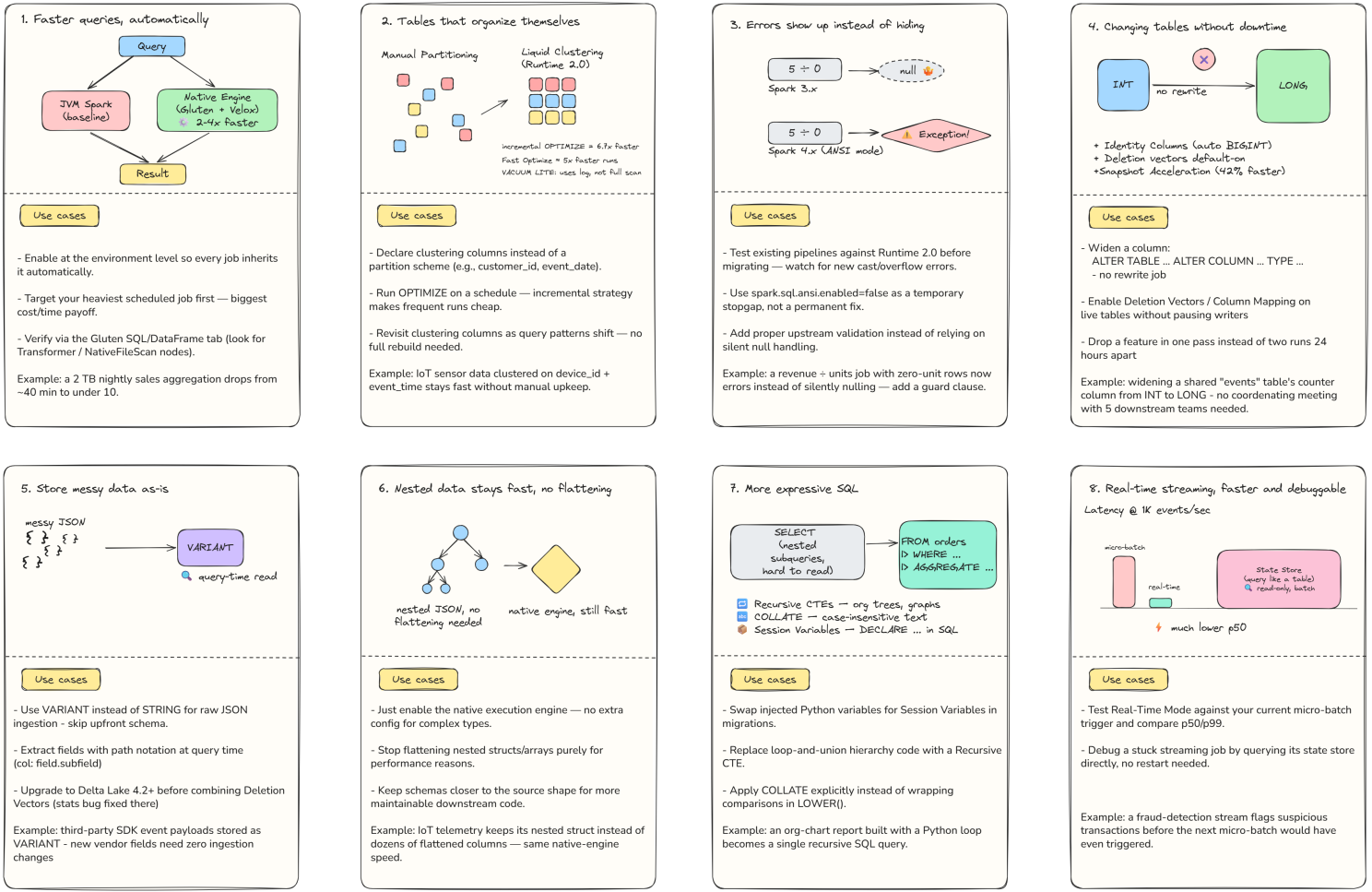
In plain terms: Fabric can now run many queries much faster — sometimes several times faster — without you changing any code. You just turn it on.
The technical detail: Supported operators run through a rewritten, hardware-optimized execution path — Microsoft’s Native Execution Engine (NEE), built on the open-source Apache Gluten and Velox projects — instead of the standard Java-based engine. Your query goes through the normal planning stages (unresolved logical plan → logical plan → optimized logical plan), and at the physical plan stage, Gluten’s transformation rules and a cost model decide which parts run as native Velox operators versus falling back to standard JVM tasks. This happens transparently, per operator, not as an all-or-nothing switch. Adaptive query execution, cost-based rewrites, column pruning, and predicate pushdown all keep working when operators are offloaded. Native acceleration applies to Parquet and Delta formats; JSON, XML, and CSV mostly still run on the standard path (Runtime 2.0 adds CSV support via Mison parsing).
How to check if it’s actually helping: the Spark UI has a dedicated “Queries for Native Engine” tab. Light blue nodes in the query plan mean JVM fallback; green nodes mean native execution. The same tab shows why a fallback happened — common causes include unsupported operators (certain window functions, LATERAL VIEW EXPLODE variants) and structured streaming jobs, which currently always fall back to JVM.
How to adapt:
- Enable the native execution engine in a Fabric Environment item, and attach it to a dev/test notebook first.
- Baseline first: measure performance on standard JVM Spark before enabling NEE, so you have a real comparison, not an assumed one.
- Run your existing workload as-is — no code changes needed.
- Check the “Queries for Native Engine” tab to confirm native execution and investigate any fallbacks.
- Write queries that stay on the fast path: standard SQL functions and built-in aggregations (
SUM,AVG,COUNT) have native vectorized kernels; custom Java/Scala UDFs force JVM fallback for that operation (Runtime 2.0 does add native Python and Scala UDF support, narrowing this gap).
Two anti-patterns to avoid:
- Mixing NEE with legacy RDD operations — RDD transformations bypass the native engine entirely; convert RDD logic to DataFrame/SQL to stay on the fast path.
- Disabling NEE globally because one query regressed — wrap just that query in a config toggle instead. A global disable sacrifices the 2–4x performance gain for every other workload in your environment.
Real example: A retail analytics team’s nightly aggregation over a 2 TB transaction table, which normally takes 38 minutes, finishes in 9 minutes after enabling the native engine in a test environment — with no code changes to the notebook itself.
② Tables that organize themselves
In plain terms: You used to have to manually decide how to split up a big table for performance, and redo that work whenever query patterns changed. Now you just tell Fabric which columns matter, and it keeps the data organized for you — and the maintenance behind it just got a lot smarter and faster too.
The technical detail: This is Liquid Clustering. It stores rows with similar clustering-column values in files with tight value ranges, so a query filtering on those columns can skip files whose ranges can’t contain matching rows. You declare it as table metadata (CLUSTER BY (order_date, region)), and unlike Hive partitioning it doesn’t create a directory per value; unlike Z-Order, the definition persists on the table and can be changed later without redefining it on every run.
Why Runtime 1.3 made people cautious about it: the old strategy reclustered every file in a partial “Z-Cube” (the group of files sharing a clustering definition) any time OPTIMIZE ran — so a 99 GB partial Z-Cube plus a 1 KB append meant rewriting the full 99 GB. Repeat that on every small append, and you get serious write amplification. This is why Auto Compaction (which runs synchronously after every write) was arguably incompatible with Liquid Clustering by design on Runtime 1.3 — a 2-second write could balloon into tens of minutes of reclustering.
What Runtime 2.0 actually changed — the file selection logic, not the clustering algorithm itself:
- Incremental clustering —
OPTIMIZEnow only touches unclustered files (new writes), small files, unhealthy files, deletion-vector-heavy files, and files flagged by Auto Reclustering — already-clustered, healthy, appropriately-sized files are left untouched. This is on by default. - Auto Reclustering protects query performance as new data lands: it detects overlapping file ranges during
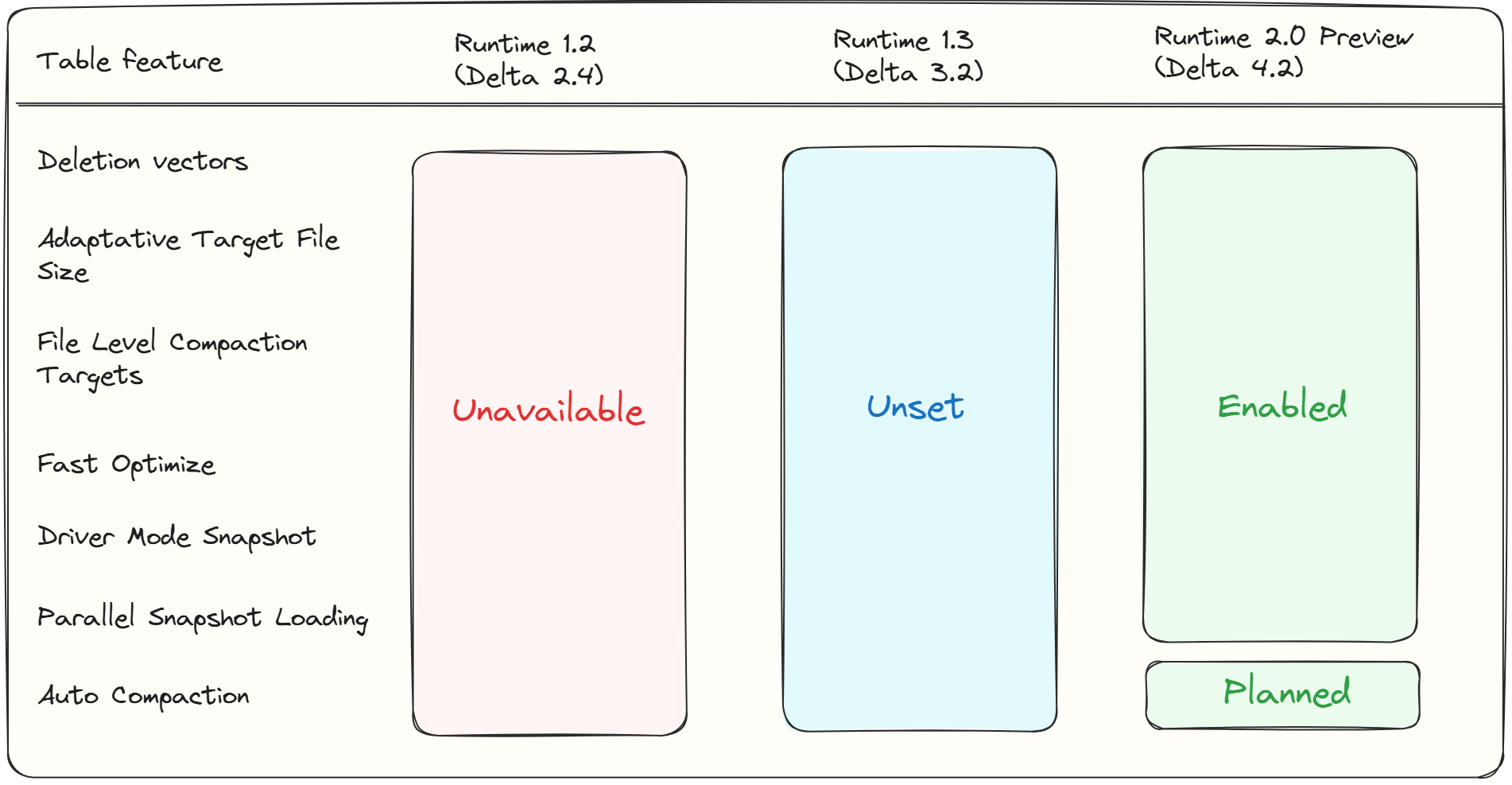
OPTIMIZEand pulls them into the rewrite alongside new files, controlled by two tunable thresholds (minOffendingFiles, default 4;minOverlapThreshold, default 0.75) — worth leaving at defaults unless you’ve tested extensively for your workload. OPTIMIZE FULLforces a genuine full reclustering pass, needed specifically after changing clustering columns — otherwise old files keep their previous layout until incrementally selected later.- Adaptive Target File Size (default in Runtime 2.0) — no more manually tuning target file size; it adapts automatically based on table size. Microsoft’s own published benchmark shows 30–60% faster compaction and up to 6x better file skipping when the optimal size is auto-selected.
- Fast Optimize (default in Runtime 2.0) — skips
OPTIMIZEruns on bins of small files that wouldn’t produce a large-enough compacted file anyway, and is idempotent (safe to run more often). Miles Cole’s video cites this as roughly 5x faster totalOPTIMIZEexecution time. VACUUM LITE— uses the Delta transaction log instead of a full recursive directory scan to find deletable files, avoiding expensive listing on tables with many files or deep partitions.
Choosing clustering columns well matters more than people expect: pick 1–4 columns that are actually used in WHERE filters and materially narrow the data read. Column order doesn’t express priority the way it does in partitioning — it doesn’t affect the multidimensional layout. Every additional key dilutes the skipping benefit available to the others, so adding every filterable column “just in case” is not automatically better.
Measuring whether it’s working: Runtime 2.0 adds a clusteringQuality() API (via DeltaTable.forName(...).clusteringQuality()) that reports metrics like avg_depth (closer to 1.0 is healthier), overlap_ratio (closer to 0 is healthier), and skipping_effectiveness (closer to 1 is healthier) — useful for validating a layout choice, though it should be paired with real query performance testing, not used alone.
Important nuance, corrected thanks to Miles Cole’s own comment on this article: clustering is applied whenever OPTIMIZE runs — but it’s not limited to manually scheduled runs. If Liquid Clustering is enabled on a table, Auto Compaction does cluster the data too, not just compact small files. With Runtime 2.0’s incremental strategy specifically, Auto Compaction “works beautifully to automatically cluster data and compact small files,” in his words — meaning a table with both Liquid Clustering and Auto Compaction enabled may not need a separately scheduled OPTIMIZE job at all. Optimized Write alone still doesn’t cluster (it only sizes files correctly at write time) — but Auto Compaction is not the pure “file-hygiene-only” tool it’s sometimes described as.
How to adapt:
- For a new table:
CREATE TABLE events (...) CLUSTER BY (device_id, event_date)— keep it to 1–4 columns tied to real query filters. - For an existing table:
ALTER TABLE events CLUSTER BY (device_id, event_date). - In dev: shallow-clone the table, apply clustering, run
OPTIMIZE, and A/B test real queries before rolling out. - In production: enable the strategy, then turn on Auto Compaction rather than relying solely on a scheduled
OPTIMIZEjob — with Liquid Clustering enabled, Auto Compaction clusters the data as it compacts small files. - Only run
OPTIMIZE FULLafter an actual clustering-key change — not as a routine “just in case” job. Runtime 2.0 is specifically designed to tolerate small imperfections in exchange for much lower write cost. - Use
VACUUM LITEinstead of a full vacuum for routine cleanup on large tables.
Real example: An IoT team clusters a telemetry table on device_id and event_time instead of maintaining a rigid date/device partition scheme. Rather than scheduling a separate OPTIMIZE job, they simply enable Auto Compaction on top of the clustering definition — on Runtime 2.0, that’s enough for the table to stay both clustered and compacted automatically as new telemetry lands, and dashboard queries filtering by device stay consistently fast as data volume grows.
③ Errors show up instead of hiding
In plain terms: Spark used to quietly let some bad data slide — like turning “divide by zero” into a blank value instead of flagging it. Now it raises a clear error instead. Good for data quality, but it can break old pipelines that weren’t expecting it.
The technical detail: Spark’s ANSI SQL mode is now on by default. Division by zero, invalid type conversions, and numeric overflows now throw errors instead of silently returning nulls or wrong values.
How to adapt:
- Test existing pipelines against Runtime 2.0 in a dev environment before switching.
- Catalog new errors by category: division/math, invalid casts, overflow.
- Add explicit guards (e.g.,
CASE WHEN denominator = 0 THEN NULL ELSE ...) rather than relying on silent nulls. - If not ready, ANSI mode can be temporarily disabled as a bridge while fixes are made.
Real example: A finance job dividing revenue by unit count, where some legacy records have zero units, used to silently return null and go unnoticed. Under ANSI mode it throws — surfacing a real data quality gap that gets an explicit guard clause and a fix at the source.
④ Changing tables without downtime
In plain terms: Some table changes — like widening a number column, auto-generating IDs, or turning on newer features — used to require a maintenance window or extra tooling. Now they’re much simpler.
The technical detail:
- Type Widening lets you evolve a column’s type (e.g.,
INTtoLONG) without rewriting the underlying data — a metadata-onlyALTER TABLEoperation. - Identity Columns let Delta tables auto-generate unique
BIGINTvalues as rows are inserted, useful for surrogate keys and system-generated record identifiers. You configure a starting value and increment, though generated IDs aren’t guaranteed to be contiguous. Currently, identity columns can only be defined via the Delta Table Builder API (not plain Spark SQL or the DataFrame writer API yet) — but once the table exists, normal DataFrame writes can append data by simply omitting the identity column:
from delta.tables import DeltaTable, IdentityGenerator
from pyspark.sql.types import *

DeltaTable.createIfNotExists(spark) \
    .tableName("dbo.identity_2") \
    .addColumn("id_1", dataType=LongType(),
               generatedAlwaysAs=IdentityGenerator(start=1, step=1)) \
    .execute()
- Deletion Vectors are now default-on for new tables in Runtime 2.0. They shift from copy-on-write (any delete/update rewrites the whole file that held the changed rows) to merge-on-read (deletions are logged as a lightweight bitmap and filtered out at query time). Miles Cole’s benchmark on a 100M-row table found deleting a single row was ~8x faster with deletion vectors enabled, deleting 33% of rows was still ~2.5x faster,
OPTIMIZEran ~2x faster, andVACUUMran ~1.7x faster — but repeatedSELECTqueries ran ~2.3x slower when deletion vectors accumulated without any compaction in between (dropping to only ~1.5x slower with just a singleMERGE, and matching copy-on-write speed entirely onceOPTIMIZEran to reconcile the vectors). The practical rule: deletion vectors need a realOPTIMIZE/VACUUMmaintenance cadence to pay off — without one, read performance degrades as vectors pile up. - When not to enable them: tables with infrequent writes but frequent ad-hoc reads (the read overhead isn’t worth it if there’s little to delete), and situations requiring compatibility with older Delta readers, since enabling deletion vectors permanently raises the table’s minimum reader/writer protocol versions (reader v3, writer v7).
- Conflict-free feature enablement means Deletion Vectors and Column Mapping can now be turned on for existing tables without conflicting with concurrent transactions.
- Dropping a table feature no longer requires a 24-hour wait and history truncation, thanks to a new
checkpointProtectionwriter feature. - Delta Connect extends Delta operations over the Spark Connect protocol, making them accessible from any Spark Connect client.
- Snapshot Acceleration (default in Runtime 2.0) speeds up how fast Fabric Spark generates a Delta snapshot — results cited in Miles Cole’s video include 42% faster TPC-DS 1TB query performance and roughly a 50% reduction in snapshot-generation overhead in its first phase.
How to adapt:
- Widen a column directly:
ALTER TABLE table_name ALTER COLUMN column_name TYPE LONG. - Use the Delta Table Builder API when you need auto-generated surrogate keys on a new table.
- Enable Deletion Vectors on a live table via table properties — no writer pause needed — but pair it with a scheduled
OPTIMIZE/VACUUMcadence, not a one-time toggle. - Communicate schema changes to downstream consumers as a heads-up, not a scheduling request.
Real example: A platform team’s shared page_views table has an INT counter column approaching its limit. Previously this meant coordinating a rewrite window with five consuming teams; now it’s a single ALTER TABLE statement and a Slack message. Separately, their user_events table processes frequent deletes for GDPR requests — enabling deletion vectors there cuts delete time dramatically, and they add a nightly OPTIMIZE job specifically because they know unmerged vectors would otherwise slow down their dashboard’s read queries.
⑤ Store messy data as-is
In plain terms: If you’re pulling in JSON data whose structure keeps changing, you no longer have to lock in a rigid format upfront.
The technical detail: VARIANT is a new column type built for semi-structured data, supporting schema-on-read — no schema needs to be defined at write time, and fields are queried at read time with colon path syntax. Delta’s schema conversion now correctly handles VariantType. Delta Lake 4.2 fixed a bug where Variant column statistics were dropped during MERGE/UPDATE on tables with Deletion Vectors enabled.
How to adapt:
- Define the raw payload column as
VARIANTinstead ofSTRING. - Extract fields at query time using path syntax (e.g.,
payload:user.id). - If combining with Deletion Vectors, confirm you’re on Delta Lake 4.2 or later.
Real example: A product analytics team ingesting third-party event payloads whose schema occasionally changes stores the raw payload as VARIANT — new fields from the vendor are queryable immediately with zero pipeline changes.
⑥ Nested data stays fast without flattening
In plain terms: Data engineers often “flatten” nested data purely to make queries run faster. Now you don’t have to.
The technical detail: The Native Execution Engine supports complex/nested types (structs, arrays, maps) directly as of Runtime 2.0, with no additional configuration required once it’s enabled.
How to adapt:
- Enable the native execution engine (same toggle as update #1).
- Keep nested fields as struct/array columns instead of flattening them for new tables.
- Test existing flattened pipelines against the nested structure directly before deciding to keep the flattening step.
Real example: An IoT platform retires a preprocessing step that flattened nested sensor telemetry into dozens of columns, after confirming query performance on the native engine is comparable when querying the nested struct directly.
⑦ More expressive SQL
In plain terms: Some things you used to have to write in Python, or express in awkward nested SQL, can now be written directly and more clearly in SQL.
The technical detail:
- SQL Pipe Syntax — a linear way to write queries by chaining steps top to bottom with
|>operators (FROM orders |> WHERE ... |> EXTEND ... |> AGGREGATE ...), instead of nesting aSELECTinside aFROM. Functionally equivalent to standard SQL, just easier to read and modify step by step. - Session Variables — declare and set variables directly in SparkSQL (
DECLARE OR REPLACE VARIABLE min_revenue DECIMAL(10,2) DEFAULT 1500.00) instead of injecting Python variables into an f-string, with ANSI SQL variable semantics that make PySpark-to-SparkSQL migrations easier. - Recursive CTEs — traverse hierarchical or iterative relationships directly in SQL (organizational trees, bills of materials, graph paths, dependency chains), without hand-rolled iterative PySpark loops or repeated DataFrame unions. The pattern: start with an anchor row, repeatedly generate the next level until a termination condition is met.
- String Collations — explicit control over how Spark compares, groups, joins, and sorts text (case-sensitive vs. insensitive, Unicode-aware vs. binary) applied directly with
COLLATE, instead of wrapping every comparison inLOWER()/UPPER().
How to adapt:
- For migrations from PySpark-heavy logic, start with Session Variables — they’re the most direct swap for injected Python variables.
- Use Recursive CTEs to replace any existing iterative-loop or repeated-union patterns for hierarchical data.
- Apply
COLLATEexplicitly wherever you currently normalize casing withLOWER()/UPPER()for comparisons, to make the intent explicit and consistent across filtering, grouping, and joins.
Real example: A team maintaining an organizational-hierarchy report previously built it with a Python loop that queried one level at a time and unioned results. A Recursive CTE replaces that entirely with a single SQL query that starts at the CEO and expands level by level until it hits employees with no direct reports.
⑧ Real-time streaming gets faster and easier to debug
In plain terms: If you’re processing continuous streams of data (like sensor readings or clickstreams), results can now show up faster, and you can inspect what your streaming job is doing without stopping it.
The technical detail:
- Real-Time Mode is a new low-latency streaming trigger. A 1K events/second benchmark shown in Miles Cole’s video shows p50 latency dropping sharply compared to standard micro-batch triggering, with p99 latency improving substantially too.
- Native State Store Queries — Spark 4 introduces a State Data Source that exposes streaming state-store keys and values as a normal batch DataFrame, so you can query the latest committed state (or a specific batch’s state) directly for debugging, validation, testing, or monitoring state growth. This reads committed checkpoint state through a separate batch query — it does not modify the live state store.
How to adapt:
- For latency-sensitive streaming workloads, test Real-Time Mode against your current micro-batch trigger and compare p50/p99 latency on your own data.
- When debugging a stuck or misbehaving streaming job, query its state store directly via the State Data Source instead of only relying on logs or restarting the job.
Real example: A team running a real-time fraud-detection stream, previously bottlenecked by micro-batch latency, tests Real-Time Mode in a dev pipeline and sees per-event latency drop enough to flag suspicious transactions before the next batch would have even triggered.
Lower priority: there’s also a Java and Python version bump under the hood — necessary plumbing, not an architectural decision point.
5. Table maintenance: three different things that get confused
This is worth its own section because it’s a common point of confusion. “Auto compaction,” “optimized writes,” and “clustering” solve three different problems, and doing one does not give you the others.
| Approach | What it actually does | Runs automatically? | What it does NOT do |
|---|---|---|---|
| Optimized Write | Shuffles data before writing so files come out right-sized from the start | Yes, on every write | Doesn’t reorganize existing files or cluster by column |
| Auto Compaction (Runtime 1.3) | Merges small files together in the background after writes | Yes, once a file-count threshold is crossed | Doesn’t cluster by column even if Liquid Clustering is defined on the table |
| Auto Compaction (Runtime 2.0) | Merges small files and clusters, if Liquid Clustering is enabled on the table | Yes — no separate OPTIMIZE schedule needed | — |
| Liquid Clustering, scheduled OPTIMIZE | Groups similar column values together physically, enabling file skipping on filtered queries | No — only applies when OPTIMIZE is explicitly run | Still a valid approach on Runtime 1.3, or anywhere Auto Compaction isn’t enabled |
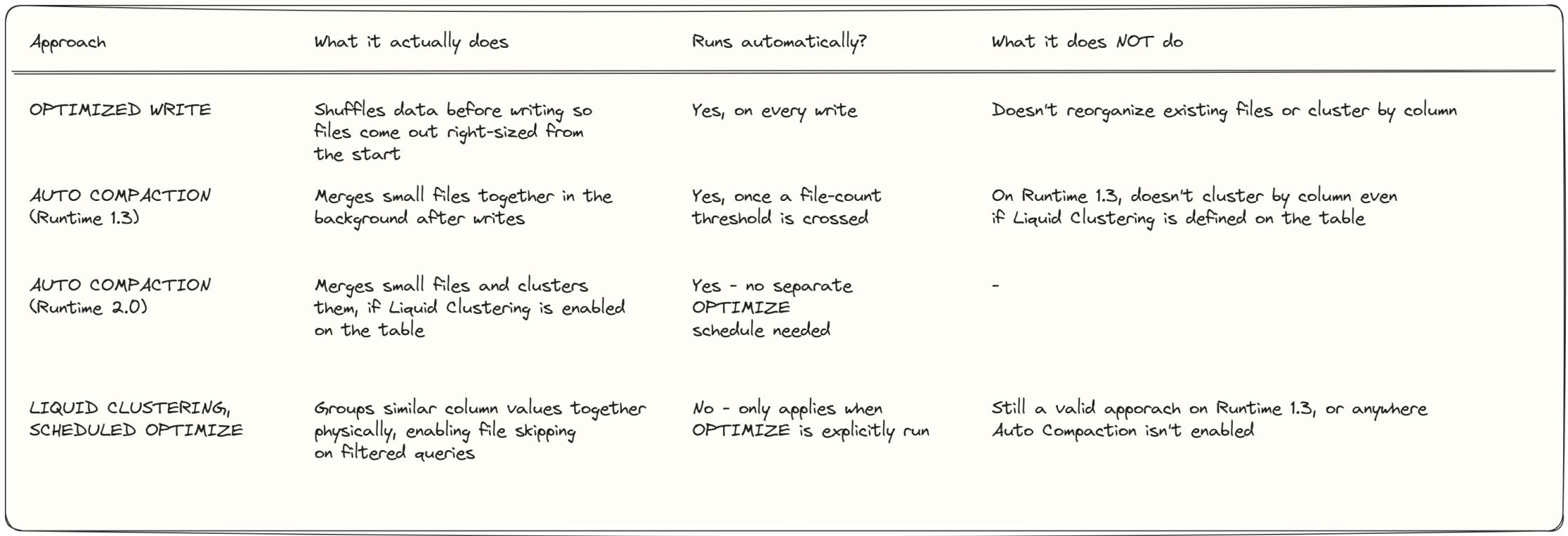
Correction, courtesy of Miles Cole himself (who commented directly on an earlier version of this article — he’s the Principal Program Manager behind this feature at Microsoft): Auto Compaction does cluster data if Liquid Clustering is enabled on the table. With Runtime 2.0’s incremental clustering strategy specifically, Auto Compaction “works beautifully to automatically cluster data and compact small files” — in his words. So on Runtime 2.0, a table with both Liquid Clustering and Auto Compaction enabled genuinely doesn’t need a separately scheduled OPTIMIZE job for routine maintenance. OPTIMIZE (and OPTIMIZE FULL) still matter for one-off situations — e.g., after changing clustering columns — but they’re no longer the only way to get clustering applied.
Miles Cole’s benchmark on file-hygiene strategies more broadly found that combining Auto Compaction with Optimized Write produced the lowest total runtime and the most consistent file counts and query performance across tested workloads. Runtime 2.0 also adds spark.microsoft.delta.autoCompact.onCheckpointOnly.enabled, which eliminates the cost of evaluating whether compaction is needed on every single write.
Practical takeaway: keep Auto Compaction and Optimized Write on for every table — this part can run hands-off indefinitely. If a table also has Liquid Clustering enabled and you’re on Runtime 2.0, Auto Compaction alone is enough to keep it both clustered and compacted — no separate OPTIMIZE schedule required. On Runtime 1.3, or if Auto Compaction is off, you’ll still want a scheduled OPTIMIZE for clustered tables.
Several of these features (Deletion Vectors, Adaptive Target File Size, Fast Optimize) are also available on Runtime 1.3 — they’re just not on by default there. Microsoft’s own guidance is that they’re recommended to turn on manually for production use, even on 1.3.
6. Is it adoptable today?
Short answer: not for production.
- Runtime 1.3 remains the GA, supported version for production workloads.
- Runtime 2.0 is explicitly public preview — some features and APIs may still change before general availability.
- A few preview rough edges: session startup can take a few minutes without pre-warmed pools, R isn’t supported yet, and several Delta 4.x features only work inside Spark experiences — not across every Fabric engine that might read the same table.
7. How this should shape your architecture right now
- Keep production on Runtime 1.3. No reason to trade stability for a preview engine.
- Pilot Runtime 2.0 in dev/test. Point a non-critical pipeline at it and learn what breaks before it’s a production problem.
- Be selective about Delta 4.x features. If your lakehouse tables are read by multiple Fabric experiences, hold off enabling newer features until compatibility broadens.
- Handle the separate deprecation clock. Runtime 1.2 is being retired — if you’re still on it, that upgrade to 1.3 is the more urgent task.
- Don’t add clustering where you don’t need it. If your tables are small or your queries vary widely, Auto Compaction and Optimized Write are enough — clustering adds maintenance cost for no benefit in that case.
- Turn on what’s already available on 1.3. Deletion Vectors, Adaptive Target File Size, and Fast Optimize can be enabled manually today, without waiting for Runtime 2.0.
- Track the roadmap, not just the release notes. Runtime 2.0 won’t stay in preview indefinitely — start migration planning now.
Bottom line
This release is Microsoft closing a real gap — performance, cost efficiency, more expressive SQL, and reduced manual table maintenance — while nudging Fabric onto the same footing as its more established competitors. It’s worth testing early. It’s not worth betting production on yet.
Sources
Official Microsoft Fabric documentation:
- Runtime 2.0 overview, versions, preview status — learn.microsoft.com/fabric/data-engineering/runtime-2-0
- Native Execution Engine — learn.microsoft.com/fabric/data-engineering/native-execution-engine-overview
- Liquid Clustering mechanics — learn.microsoft.com/fabric/data-engineering/native-execution-engine-z-order-liquid-clustering
- Complex-type support — learn.microsoft.com/fabric/data-engineering/native-execution-engine-udf-complex-types
- Runtime lifecycle and GA status — learn.microsoft.com/fabric/data-engineering/lifecycle
- Performance benchmarks — learn.microsoft.com/fabric/data-engineering/runtime
- Table compaction, auto compaction, fast optimize — learn.microsoft.com/fabric/data-engineering/table-compaction
- Cross-workload table maintenance and optimization — learn.microsoft.com/fabric/fundamentals/table-maintenance-optimization
Official Delta Lake project:
- Type Widening, Delta Connect, VARIANT support — delta.io/blog/2025-09-25-delta-lake-40
- Conflict-free feature enablement, checkpointProtection — github.com/delta-io/delta/releases
- Delta 4.2 release notes — github.com/delta-io/delta/releases/tag/v4.2.0
Databricks (official, for cross-platform context on compaction and clustering behavior):
- Spark 4.0 features and ANSI mode default — databricks.com/blog/introducing-apache-spark-40
- Control data file size / liquid clustering vs auto compaction — learn.microsoft.com/azure/databricks/delta/tune-file-size
Independent technical blog (widely cited benchmarks and deep-dive detail):
- Miles Cole, “Mastering Spark: The Art and Science of Table Compaction” — milescole.dev
- Miles Cole, “How Incremental Liquid Clustering Works” — milescole.dev
- Miles Cole, “Unlock Faster Writes in Delta Lake with Deletion Vectors” — milescole.dev
- Miles Cole, Concept Playground (interactive models for Incremental Liquid Clustering, Auto Compaction, and Deletion Vectors) — milescole.dev/playground
Video (source for Identity Columns, SQL Pipe Syntax, Session Variables, Recursive CTEs, String Collations, Real-Time Mode, Native State Store Queries, and the specific benchmark figures throughout this article):
- Miles Cole (Spark Specialist, Microsoft), “Inside Fabric Runtime 2.0: Spark 4 and Delta 4 in action” — youtube.com
Note: Runtime 2.0 is in active public preview — version numbers and feature availability may shift before general availability. Worth a quick re-check against the Microsoft Learn pages above before publishing.
Have you started piloting Runtime 2.0, or waiting for GA? Reply and let me know how your team’s approaching it.
Enjoyed this?
Get new articles like this one straight to your inbox.