
12 Jul 2026 · Architecture, Data Governance
Deploying Your Data Platform on Microsoft Fabric: Personal Advice From the Trenches
The choice of a platform should always come from the freedom to leave it.
Microsoft Fabric gets pitched as “everything in one place”: ingestion, transformation, warehousing, BI, all under one SaaS umbrella. That pitch is true — and it’s exactly why you need to be careful with it.
Here’s the question I ask myself before building anything in Fabric:
“If tomorrow I had to run this same solution on my own servers, outside of this service, how painful would that be?”
That single question changes how you design. It’s not about distrusting Microsoft or avoiding Fabric — it’s about avoiding decisions that quietly trade short-term speed for long-term hostage-taking.
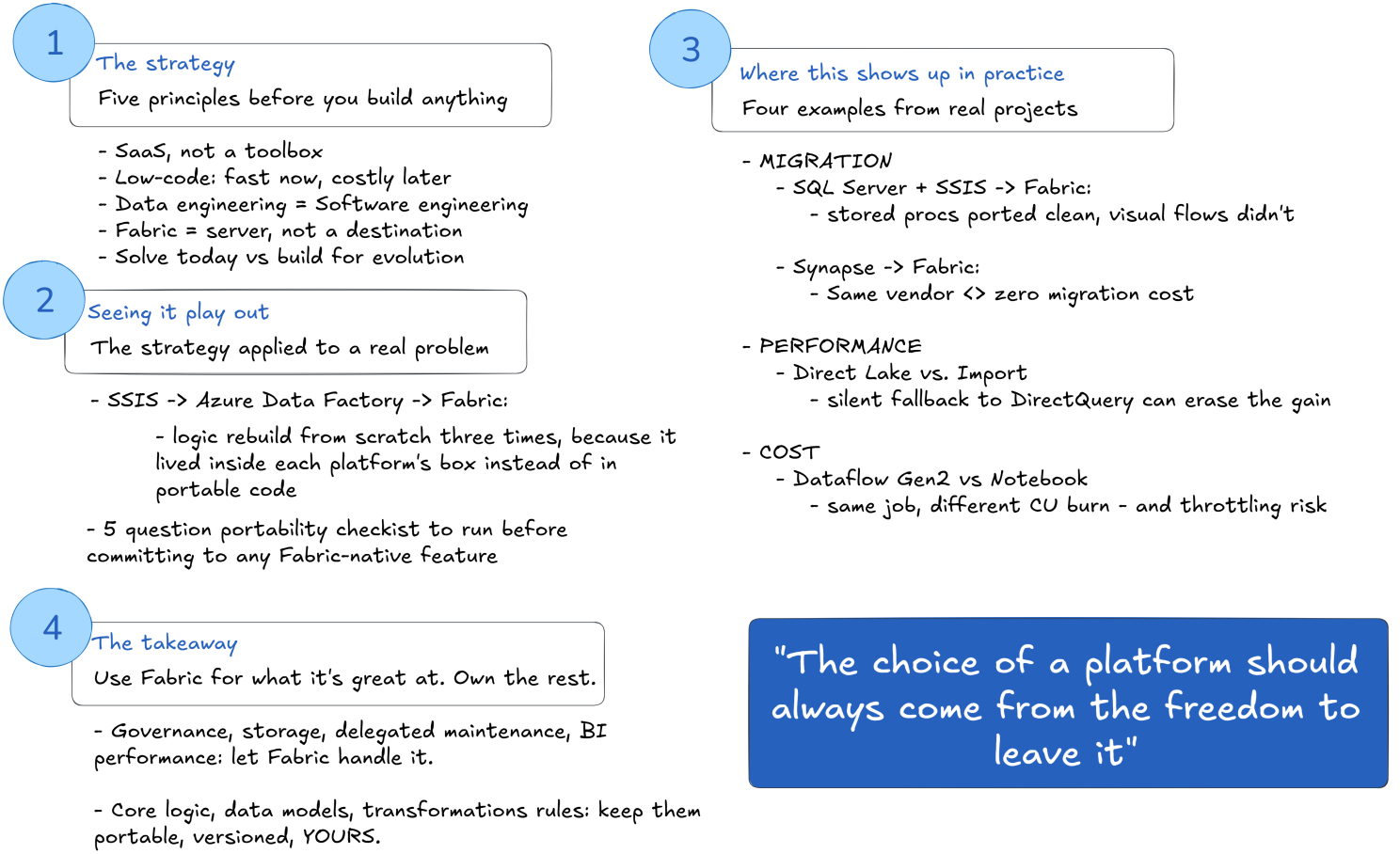
Part 1 — The strategy
Fabric is a SaaS, not a box of tools
It’s tempting to treat Fabric like a toolbox: pick a Dataflow here, a notebook there, a Power BI report on top, and call it a data platform. But a toolbox implies you can swap tools freely. A SaaS platform doesn’t work that way — it wants your logic, your metadata, and your orchestration living inside it.
Example: build your entire transformation layer in Dataflows Gen2 using Power Query M, and you’ve written business logic in a language that barely exists outside the Power Platform ecosystem. Do the same transformation in a PySpark or SQL notebook, and you’ve written something that runs almost anywhere — Databricks, a local Spark cluster, another cloud, or even a container in your own datacenter.
Same result today. Very different exit cost tomorrow.
Low-code is fast today, expensive later
Low-code tools sell speed, and they deliver it — for the first version. The cost shows up later, in three places:
- Debugging at scale. A drag-and-drop pipeline with 40 steps is much harder to diff, version, and test than 40 lines of readable code.
- Team scalability. Low-code skills are Fabric-specific. Code skills (SQL, Python, Spark) transfer to your next project, your next platform, and your next hire’s resume.
- Governance sprawl. Dozens of Dataflows built by different teams, with logic buried in visual canvases, become nearly impossible to audit a year later.
Low-code isn’t wrong — it’s a tool for prototypes, one-off reports, and business-user self-service. Treat it as the core of your data platform, though, and you’re building technical debt that compounds.
Treat data engineering as software engineering
This is probably the single best piece of advice I’ve absorbed on this topic, and it underlies everything else in this article: data engineering should be held to the same standards as software engineering, as much as the platform allows.
In practice, that means:
- Version control, not “the last version I clicked save on.” Notebooks and scripts in Git, with real commit history, not a Dataflow whose only history is “who edited it last” in a UI.
- Code review, not “it ran once in dev, ship it.” A pull request on a transformation notebook gets a second pair of eyes on the actual logic — hard to do meaningfully on a visual canvas.
- Testing, not “check the row count looks about right.” Unit tests on transformation functions, data quality checks on outputs, the same discipline you’d expect from any production codebase.
- Modularity and reuse, not copy-pasting the same five steps into twelve different pipelines. A shared library of transformation functions beats twelve slightly-different versions of “clean the customer table.”
Fabric doesn’t get in the way of any of this — notebooks support Git integration, you can structure PySpark code into reusable modules, you can write tests. The tools are there. What’s missing, usually, is the habit. Data teams often inherit a “get the report out” culture from the BI world, where the visual tool is the whole job. Bringing software engineering discipline into that world is what actually protects you from the low-code trap and the box-lock-in problem described above — they’re the same problem, seen from two angles.
Think of Fabric as a server, not a destination
There’s a mental shift that changes everything once you make it: stop thinking of Fabric as “the data platform” and start thinking of it as a server with delegated maintenance — compute and storage that someone else patches, scales, and keeps available, nothing more.
That distinction matters because of what it implies you keep. If Fabric is “the platform,” then the platform’s boundaries become your architecture’s boundaries — you design around its features, its wizards, its native integrations, and over time your solution’s shape is dictated by what the product offers this year. If Fabric is instead “a managed server I happen to be renting,” you design your solution the way you always would — logic, models, pipelines, ownership — and you simply place it on infrastructure you don’t have to patch or scale yourself. The maintenance is delegated. The architecture isn’t.
Get this backwards, and the symptoms show up quietly: your roadmap starts being driven by what Fabric ships next, your team’s skills become “Fabric skills” instead of transferable engineering skills, and every project starts with “what does Fabric let us do” instead of “what does the business need.” At that point you’re not using the platform to solve your problems — you’re working for the platform, instead of the platform working for you.
The real design question: solving today, or building for evolution?
This is the mindset shift that matters more than any Fabric feature: are you solving this ticket, or are you building a service that will still make sense in two years, after three more requirements changed?
A quick example. Say you need to load sales data into a Warehouse for a dashboard.
- Short-term fix: one Dataflow Gen2, hardcoded source, hardcoded schema, wired directly to one Power BI report.
- Reusable service: a notebook-based ingestion pattern with parameterized source/target, landing in Delta format on OneLake, decoupled from any single downstream consumer — so the next team that needs “sales data” doesn’t rebuild the wheel, they just consume the existing table.
The second approach takes longer on day one. It pays for itself the third time someone needs that data.
Part 2 — Seeing it play out
The problem I keep seeing: SSIS → Azure → Fabric
Here’s a pattern many of us have lived through, and it’s the clearest proof of why the mindset above matters.
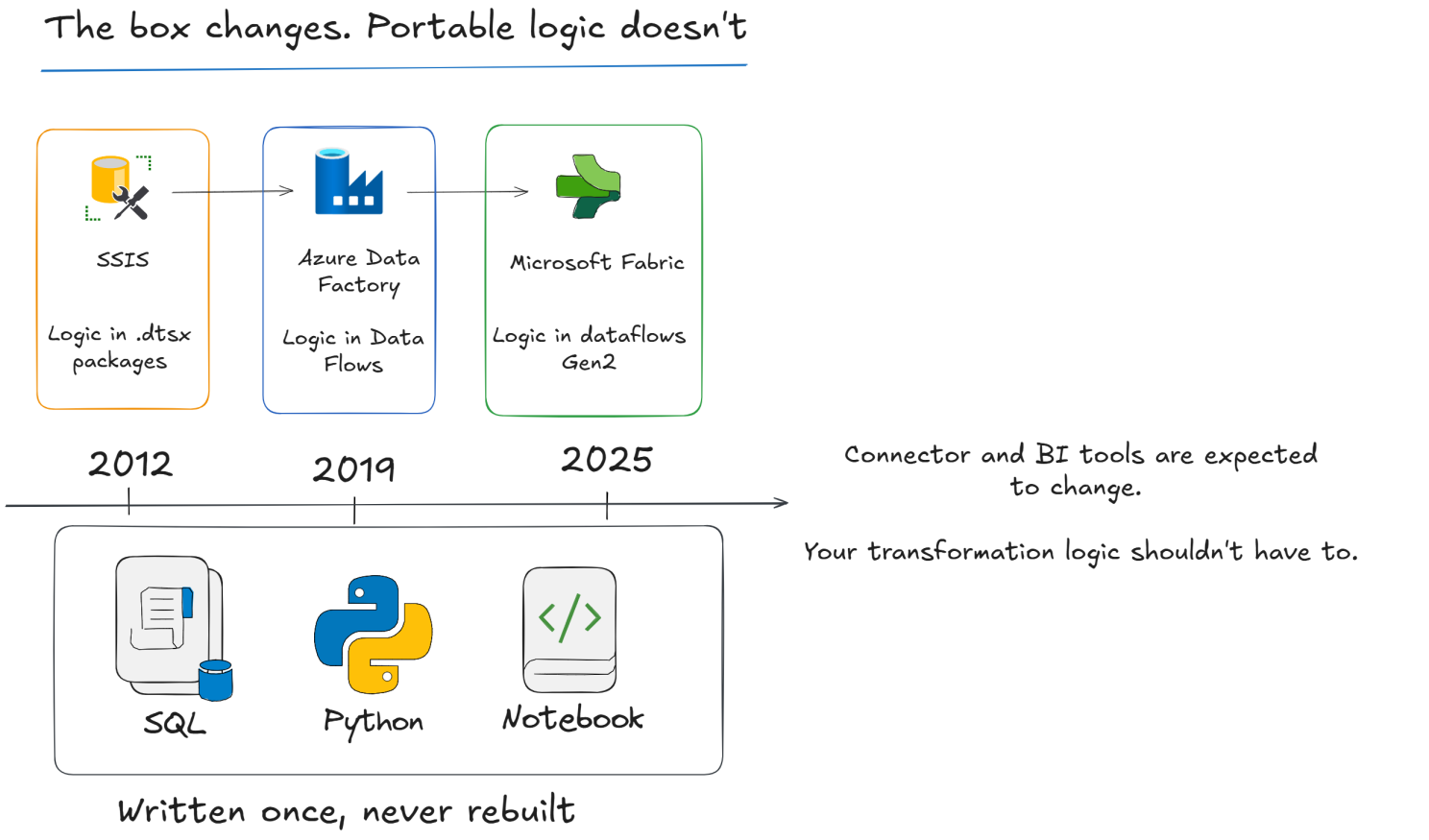
You started with SSIS. Business logic, transformations, orchestration — all wrapped inside .dtsx packages, tied to SQL Server. Then the company moved to Azure Data Factory: SSIS packages got lifted (sometimes via SSIS Integration Runtime, sometimes rebuilt from scratch), and business logic moved into ADF pipelines, Mapping Data Flows, and stored procedures. Now the company moves to Fabric: those ADF pipelines get rebuilt again, some logic goes into Dataflows Gen2, some into notebooks, some into pipeline activities.
Notice what happened three times in a row: the platform changed, and the business logic had to be rebuilt from scratch each time, because it was written in a language or a visual tool that only existed inside that platform’s box.
If, instead, your transformations had lived in SQL and PySpark from day one — versioned in Git, independent of SSIS, ADF, or Fabric — the migration story would look completely different:
- The connector/ingestion layer changes (SSIS connection managers → ADF linked services → Fabric connectors). That’s expected; connectors are always somewhat platform-specific.
- The BI layer changes (SSRS → Power BI Import → Power BI Direct Lake). Also expected.
- But your core logic — the actual transformations, the business rules, the calculations that define what “net revenue” or “active customer” means in your company — stays untouched. You just point it at a new engine.
That’s ownership. When your logic lives entirely inside the box — Dataflows, SSIS packages, proprietary pipeline JSON — you don’t own your data platform. Microsoft (or whoever the vendor is) does, and every future migration becomes a full rewrite instead of a re-plug.
A portability checklist I actually use
Before I commit to a Fabric-native feature, I run it through a few questions:
- Can I get the data out in an open format? OneLake stores data as Delta Parquet — good. But some artifacts (semantic models, Dataflow logic, certain connectors) don’t export cleanly.
- Can my transformation logic run outside Fabric with minimal rewrite? Notebooks with PySpark/SQL: yes, mostly. Dataflow Gen2 with complex M queries: no.
- Is my orchestration logic portable? Fabric pipelines are similar to ADF pipelines conceptually, but migrating them to Airflow or another orchestrator is still a rewrite, not a copy-paste.
- Am I locked into Fabric capacity economics? Capacity Units (CUs) and throttling behavior are Fabric-specific cost mechanics. A workload tuned to avoid Fabric throttling isn’t necessarily an efficient workload anywhere else.
- Does my BI layer depend on Fabric-only features? Direct Lake mode is fantastic for performance, but it’s tightly coupled to OneLake — a real dependency to know about, not necessarily one to avoid.
None of these questions should make you avoid the feature. They should make the trade-off visible and deliberate, instead of something you discover during a forced migration.
Part 3 — Where this shows up in practice
Migration case: on-prem SQL Server + SSIS to Fabric
A common scenario: a company running SQL Server on-prem, orchestrated with SSIS, decides to modernize into Fabric. The team that had all its transformation logic in T-SQL stored procedures and a handful of well-documented SSIS packages had a comparatively smooth move — the stored procs got dropped almost as-is into Fabric notebooks or Warehouse stored procedures, and only the orchestration wrapper (SSIS → Fabric Pipelines) needed rebuilding.
The team next door had built most of its logic as SSIS Data Flow Task transformations — visual, box-based, with business rules expressed as drag-and-drop derived columns and lookups. That team effectively started from zero: there was no text to port, no diff to review, just a picture to reverse-engineer and rebuild by hand inside Fabric. Same source systems, same target, wildly different migration cost — and the difference wasn’t the platform, it was where the logic had been living.
Migration case: Synapse to Fabric consolidation
Teams moving from Synapse Analytics to Fabric often assume it’s a lateral move — “it’s still Microsoft, still Spark, still SQL.” Mostly true, with two catches worth planning for:
- Dedicated SQL Pools → Fabric Warehouse isn’t a straight lift. Distribution strategies, indexing choices, and some T-SQL surface area don’t map 1:1, so stored procedures written against Synapse-specific syntax need review, not just a copy-paste.
- Synapse Pipelines → Fabric Pipelines port reasonably well since both build on the same Data Factory engine — but linked services, key vault references, and managed identities need to be reconfigured, and this is where migrations quietly stall for weeks.
The lesson here isn’t “avoid Synapse-to-Fabric,” it’s that “same vendor” doesn’t mean “zero migration cost.” Plan the SQL surface area review as its own workstream, separate from the pipeline lift-and-shift.
Performance example: Direct Lake vs Import mode
Direct Lake is one of Fabric’s strongest selling points — Power BI reads Delta tables directly from OneLake without a separate import/refresh cycle. In practice, performance is excellent when your model matches Direct Lake’s expectations: tables reasonably sized, minimal complex DAX with expensive calculated columns, and few enough dimensions that fallback-to-DirectQuery doesn’t kick in silently.
The trap: a model that used to run fine in Import mode can quietly degrade after switching to Direct Lake if you have very high-cardinality columns, complex row-level security, or many-to-many relationships. Fabric falls back transparently — the report still works, but you lose the performance you migrated for, and there’s no obvious error telling you why. Test the exact report you plan to migrate, not just a similar one, before assuming Direct Lake is a free performance upgrade.
Cost example: Dataflow Gen2 vs Notebook for the same job
This is the one that surprises people most. Take a mid-size transformation — joining three tables, filtering, aggregating, writing to a Lakehouse table — and build it two ways:
- As a Dataflow Gen2, using the Power Query engine: it consumes Capacity Units at a rate that reflects the overhead of the mashup engine translating each visual step into execution.
- As a Spark notebook doing the same joins and aggregations directly: for anything beyond trivial volume, this typically consumes noticeably fewer CUs for equivalent work, because you’re not paying the translation layer’s overhead.
On a shared F-SKU capacity, this matters beyond a single job’s cost — a handful of CU-heavy Dataflows running on a schedule can throttle other workloads on the same capacity, including interactive Power BI usage, causing spinning reports and confused business users who have no idea a Dataflow three teams over is eating their capacity. The fix usually isn’t “buy a bigger SKU” — it’s rewriting the two or three worst offenders as notebooks.
None of this means Dataflows are wrong to use. It means their convenience has a CU cost that’s easy to ignore until your capacity starts throttling in production.
Part 4 — The takeaway
My practical recommendation
Use Fabric for what it’s genuinely great at: unified governance, storage, orchestration convenience, delegated infrastructure maintenance, and BI performance. But keep your core transformation logic in portable code — SQL and PySpark in notebooks, version-controlled in Git, tested like software. Reserve low-code Dataflows for what they’re meant for: quick, business-owned, low-stakes transformations that aren’t mission-critical.
Think of Fabric as the roof over your data platform, not the foundation. The foundation — your data models, your transformation logic, your core pipelines — should be able to survive a change of roof.
And that’s really the test underneath every point in this article: the choice of a platform should always come from the freedom to leave it. Not because you plan to leave — most of the time you won’t — but because a decision you’re free to walk away from is a decision you’re actually making, instead of one that’s slowly being made for you.
What’s your experience been? Have you had to migrate a Fabric-native solution elsewhere — or decided the lock-in was worth it? I’d genuinely like to hear other perspectives.
Enjoyed this?
Get new articles like this one straight to your inbox.